

 Salesforce
 Stripe
 Chargebee
 Recurly
 PayPal
 Tango Card
 Webhooks
 Zapier



Learn more
Built for startups,
scaled for unicorns
Successfully submitted!
Error! Please try again
See what it takes to set up a referral/affiliate program
Explore GrowSurf's powerful referral marketing platform
Watch a video demo of setting up a referral/affiliate program
GrowSurf plugs into your existing tools
GrowSurf vs other referral software providers
Explore our free suite of referral marketing tools.
Explore our free suite of tools built for startups.
Get discounts on top software and services like Notion, Deel, Apollo, and 1Password.
Explore Deals →
Our free loyalty software lets you reward your customers when they leave reviews, share on social media, and mention your brand.
Get It Free →Can you guess which startups made these growth tactics famous? Test your knowledge of innovative marketing strategies that led to explosive growth.
Play Now →
Want the full setup walkthrough?
Use these docs for exact setup steps, supported fields, and troubleshooting.
GrowSurf's ActiveCampaign integration can add or update contacts in the list you choose and keep referral fields current as participants join, share, and earn referral credit.
Once those fields are available inside ActiveCampaign, you can branch automations for first-share nudges, milestone reminders, and reward follow-ups without maintaining a separate referral data workflow.
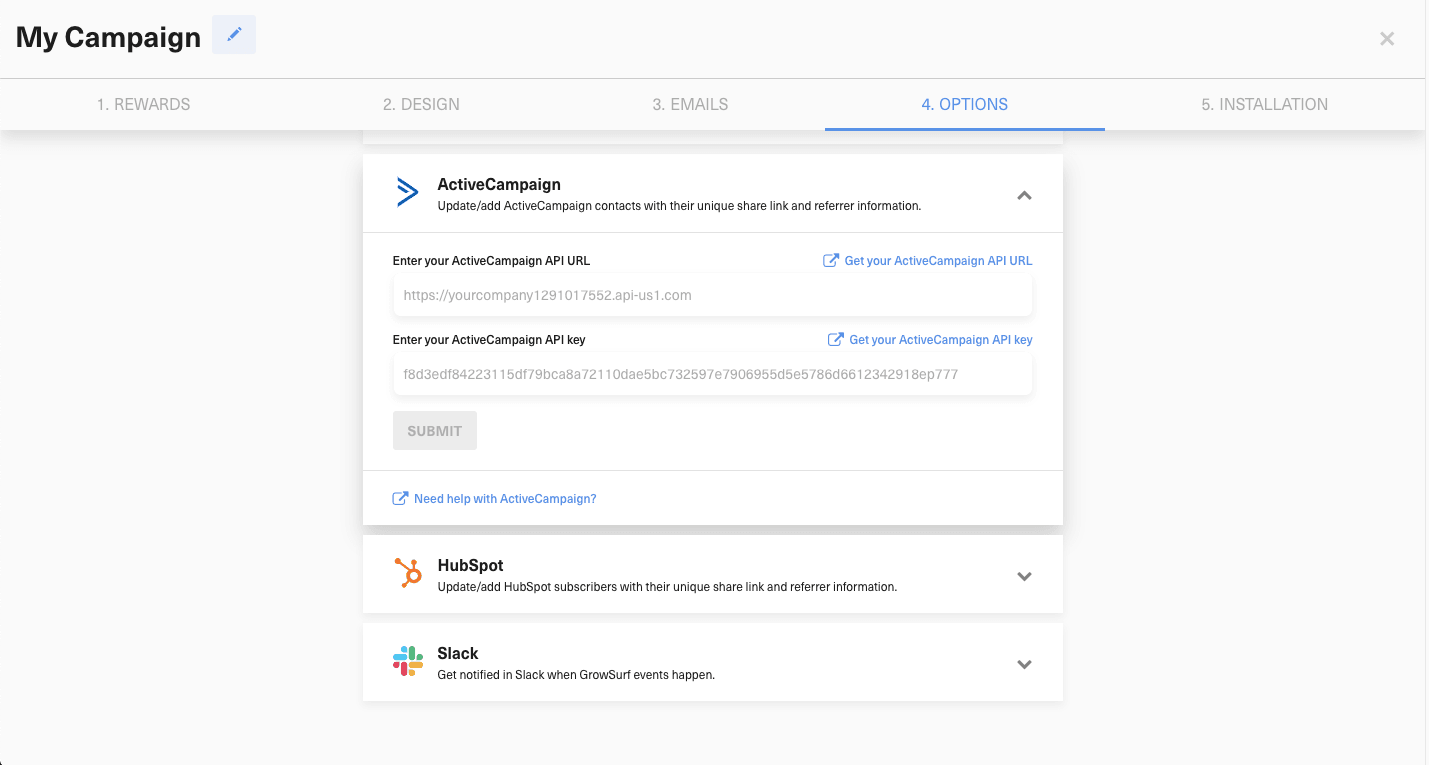
Open the ActiveCampaign integration in GrowSurf, paste the API URL and API key from your ActiveCampaign account, and submit the connection. GrowSurf's docs note that the sync only begins after the connection is enabled, so this step is best done before you import participants.
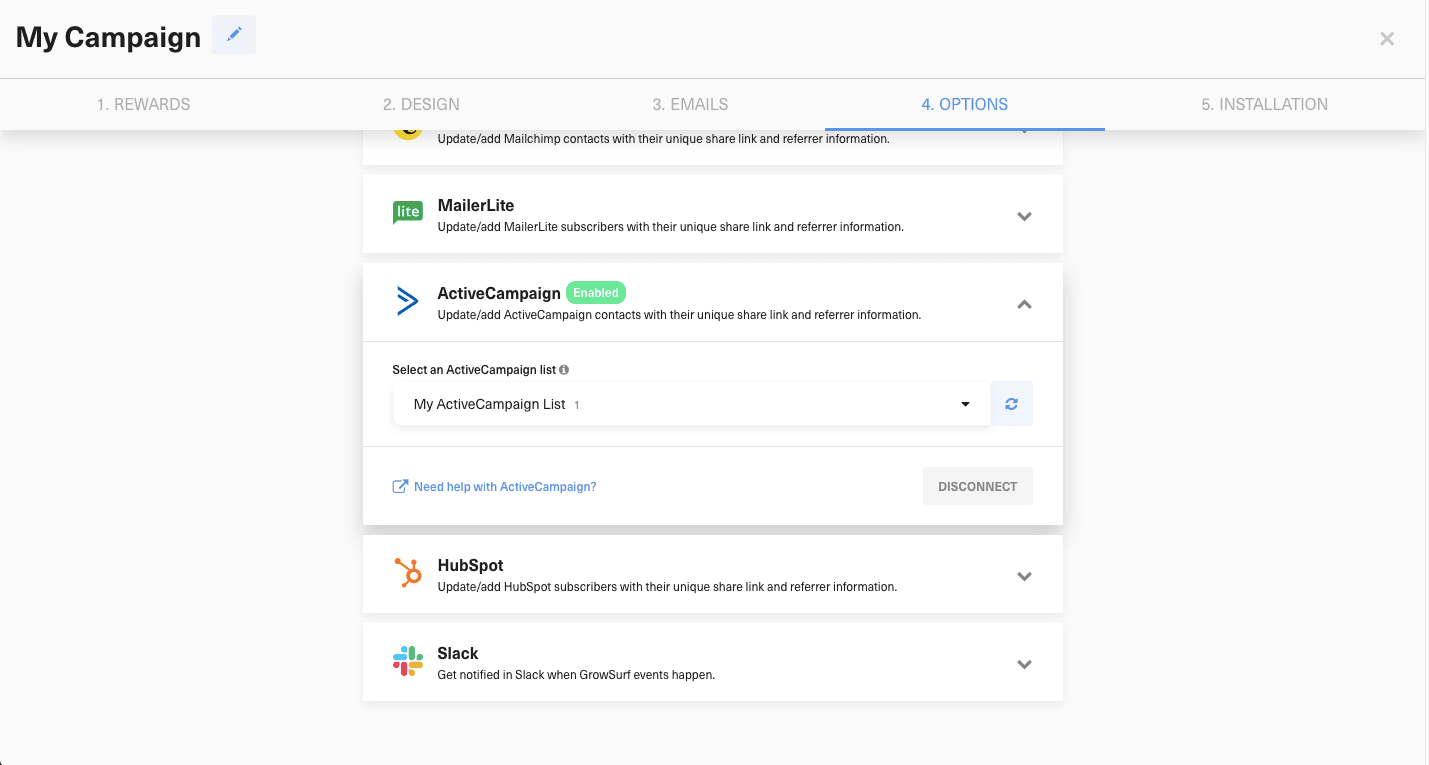
Save the same list your marketing team uses for referral emails or lifecycle campaigns. That keeps the synced GrowSurf fields on the exact contacts your automations already target.
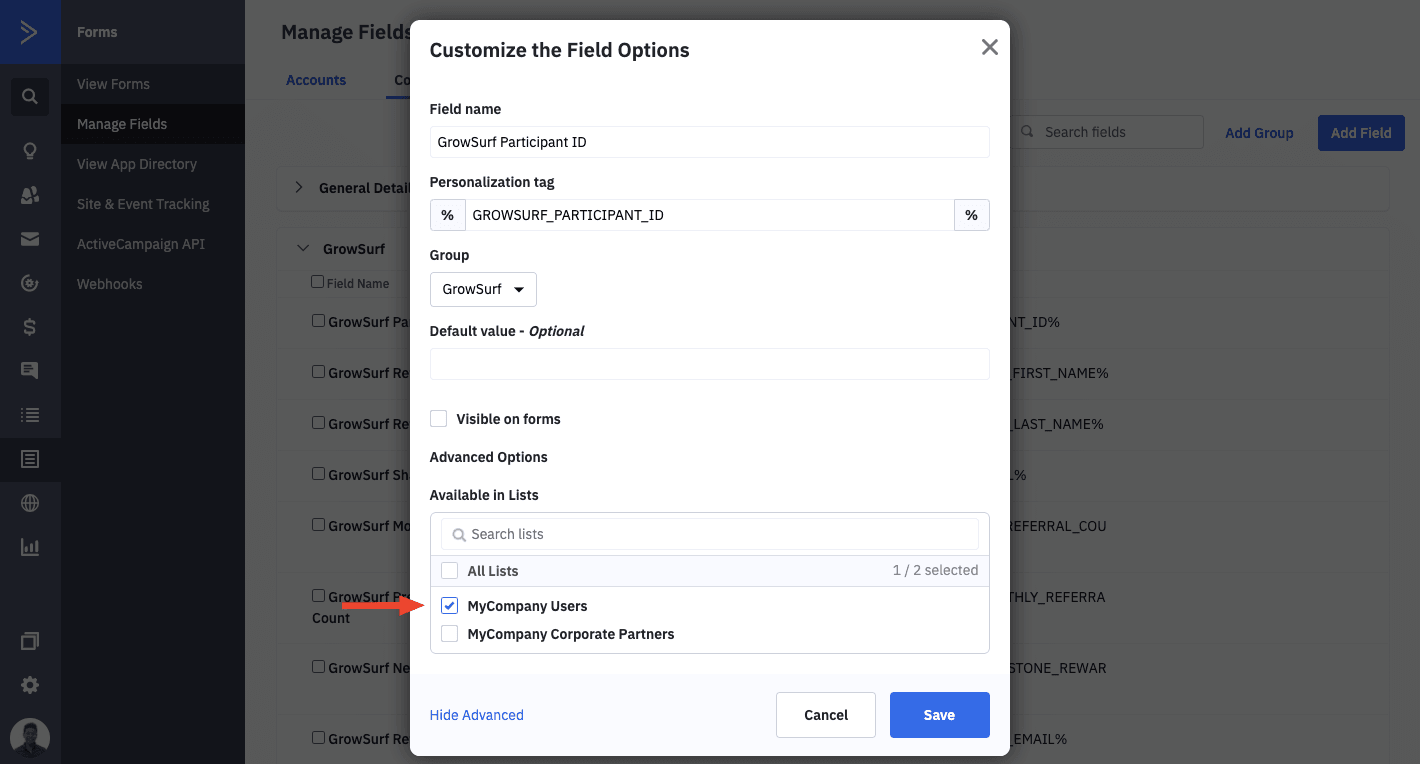
After the list is saved, open ActiveCampaign's custom field settings, edit each GrowSurf field you plan to use, and make it available to the same list GrowSurf syncs into. ActiveCampaign's current help center documents custom contact fields under Contacts > Fields.
Once the fields are available, use them in your automation logic:
%GROWSURF_TOTAL_REFERRAL_COUNT% to split first-time sharers from contacts who have already referred someone.%GROWSURF_REFERRAL_STATUS_ID% when the sequence should differ for pending versus awarded referral credit.%GROWSURF_NEXT_MILESTONE% for progress reminders or near-reward nudges in milestone-based programs.ActiveCampaign's field documentation confirms that custom contact fields can be used in the segment builder, personalization, and automation field-change workflows, so the synced GrowSurf values can drive the branches directly.
Inside the email content, use %GROWSURF_SHARE_URL% so every contact receives their own referral link. If you want a faster draft for the message layout, start with one of the GrowSurf ActiveCampaign tutorial examples and swap in your brand copy, reward details, and CTA.
Before the automation goes live, preview it with at least one contact who has zero referrals and one contact whose referral credit is already awarded. That catches the most common branching and personalization mistakes quickly.
GrowSurf only starts syncing to ActiveCampaign after the integration is connected. If you already imported contacts first, use GrowSurf's ESP resync guidance instead of rebuilding the setup from scratch.
%GROWSURF_SHARE_URL% is the field that turns an automation email into a referral email. Keep it in the body or CTA so the contact can act on the message immediately.
If you switch the synced list in GrowSurf, revisit the GrowSurf custom fields in ActiveCampaign and confirm they are available to the new list before you test the automation again.
Use the GrowSurf fields synced to each ActiveCampaign contact to build segments for first-share nudges, milestone campaigns, and advocate follow-ups.
View Guide →
Use GrowSurf sync fields inside Mailchimp automations so reminder and milestone emails follow each participant's current referral progress.
View Guide →
Use GrowSurf contact properties in HubSpot emails and workflows so every participant sees their own referral link and referral context.
View Guide →No. For the normal setup, GrowSurf handles the contact sync and ActiveCampaign handles the automation logic. You only need custom code if you are building a workflow outside the native integration.
The GrowSurf fields have to be made available to the same ActiveCampaign list GrowSurf is syncing into. If that list assignment is missing, the fields may not show up where your team expects them.
Start with %GROWSURF_TOTAL_REFERRAL_COUNT%, %GROWSURF_REFERRAL_STATUS_ID%, and %GROWSURF_NEXT_MILESTONE%. Use %GROWSURF_SHARE_URL% in the message content itself so the contact has a direct referral CTA.
Trusted by marketing and product teams at fast-growing B2C, fintech, and SaaS companies
Successfully submitted!
Error! Please try again
See referral programs that our customers have implemented.
