

 Salesforce
 HubSpot
 Recurly
 PayPal
 Tango Card
 Webhooks
 Zapier



Learn more
Built for startups,
scaled for unicorns
Successfully submitted!
Error! Please try again
See what it takes to set up a referral/affiliate program
Explore GrowSurf's powerful referral marketing platform
Watch a video demo of setting up a referral/affiliate program
GrowSurf plugs into your existing tools
GrowSurf vs other referral software providers
Explore our free suite of referral marketing tools.
Explore our free suite of tools built for startups.
Get discounts on top software and services like Notion, Deel, Apollo, and 1Password.
Explore Deals →
Our free loyalty software lets you reward your customers when they leave reviews, share on social media, and mention your brand.
Get It Free →Can you guess which startups made these growth tactics famous? Test your knowledge of innovative marketing strategies that led to explosive growth.
Play Now →
Want the full setup walkthrough?
Use these docs for exact setup steps, supported fields, and troubleshooting.
GrowSurf's Chargebee integration can do two jobs in the same setup: trigger referrals from Chargebee payments and apply Chargebee coupons or credits when a participant unlocks a reward.
If your goal is recurring, stackable subscription value, use the Credits option in GrowSurf's Coupons/Credits tab. GrowSurf then applies the credit to the Chargebee subscription tied to the participant email that earned the reward.
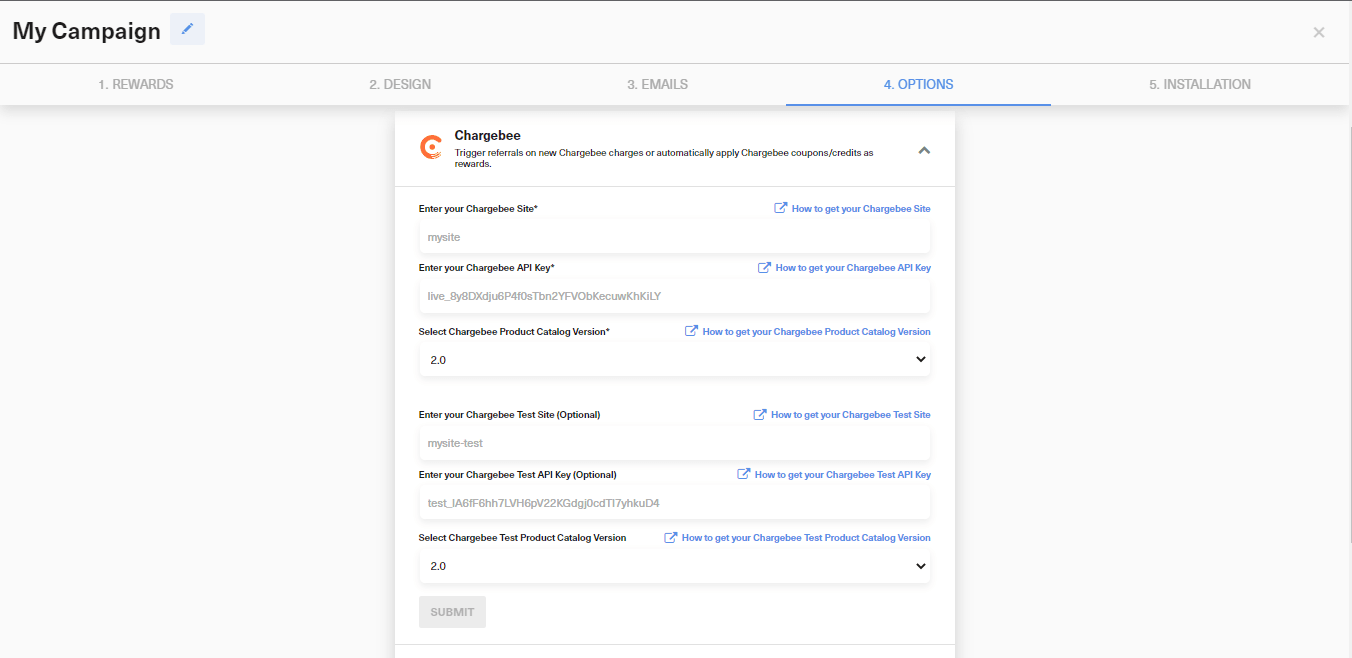
In Campaign Editor > 4. Options > Integrations, connect Chargebee with your site name, API key, and product catalog version. If you also want Chargebee payments to trigger referrals, add the webhook username and password GrowSurf expects.
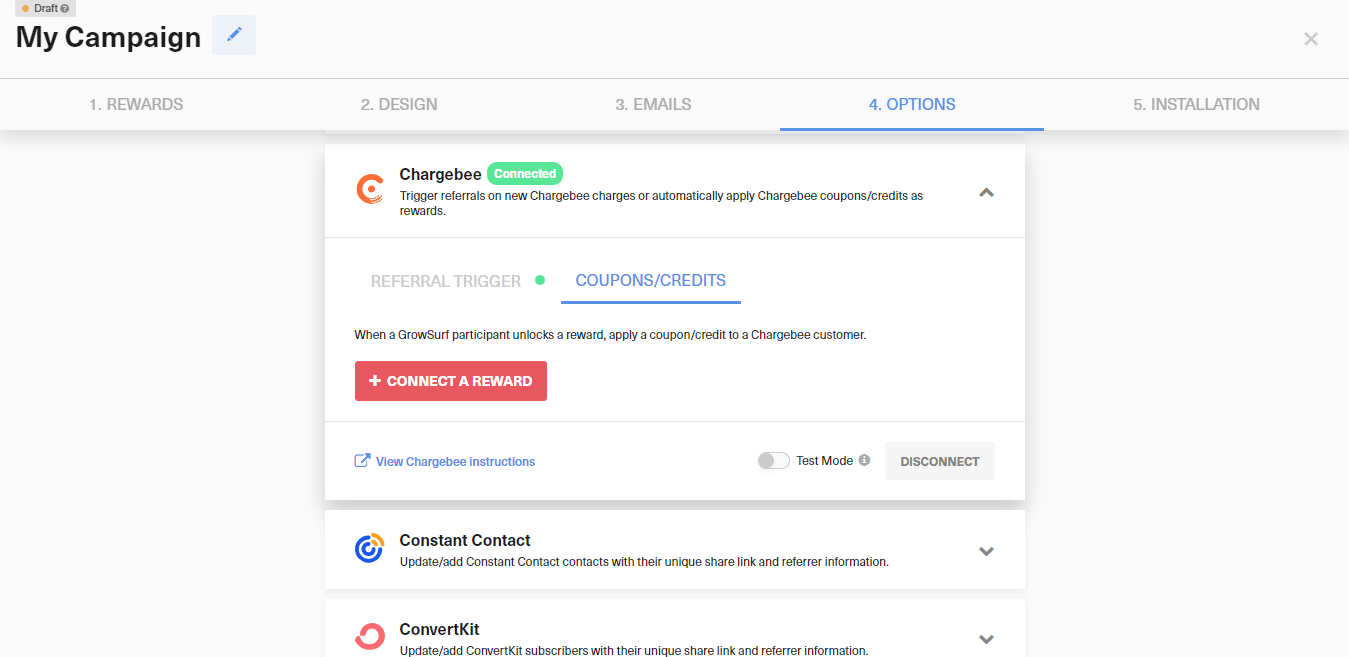
After Chargebee is connected, open Coupons/Credits and click Connect a Reward. Choose the GrowSurf reward that should apply a billing incentive when the participant wins.
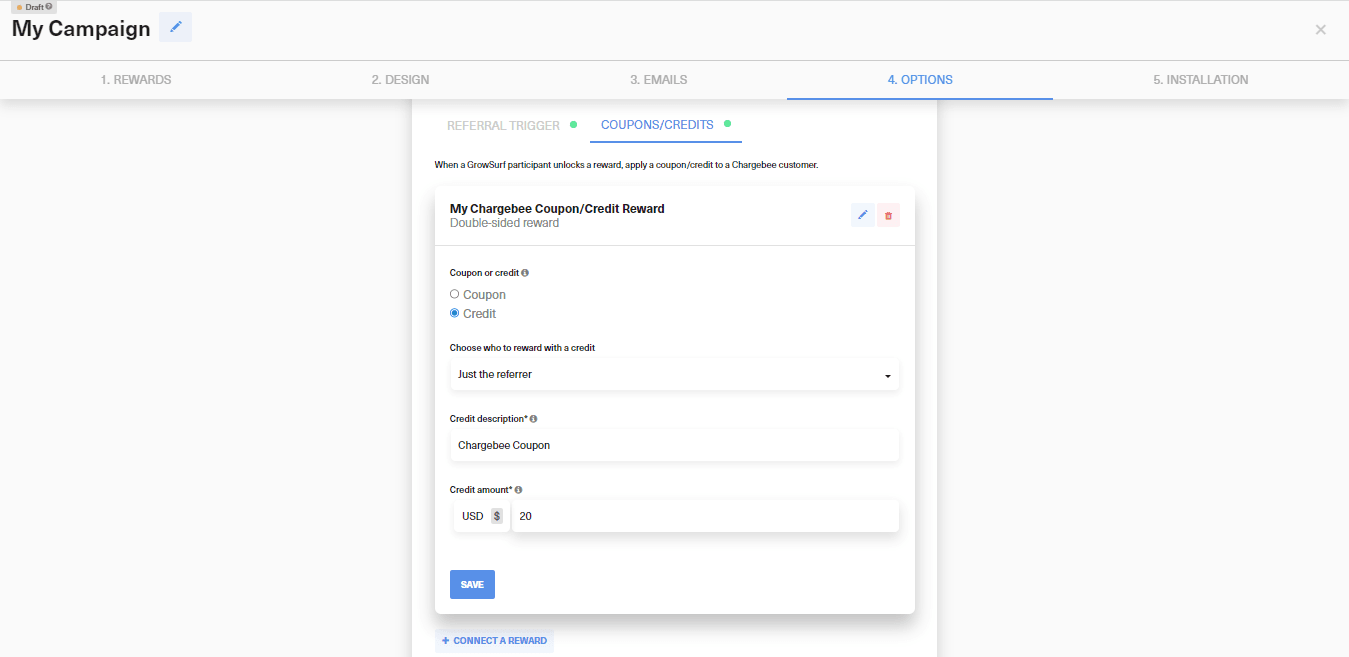
Select Credit, then enter the description and credit amount you want GrowSurf to issue. Keep your GrowSurf campaign currency aligned with the Chargebee subscription currency, because Chargebee credits only apply to subscriptions using the matching currency.
If the reward is double-sided, GrowSurf lets you issue the Chargebee credit to the referrer, the referred customer, or both. Save the reward connection after you confirm the right audience and amount.
If Chargebee is only handling reward delivery and not referral triggering, disable Referral Trigger in the integration so the setup reflects your actual workflow.
Chargebee live mode and test mode are separate. Make sure you are testing in the same mode where the reward was connected, then check the participant activity log and reward details in GrowSurf alongside the matching Chargebee customer or subscription.
If a credit fails to apply, GrowSurf records the issue in the campaign owner notification email and in the participant's reward details. At that point you can fix the mismatch and, if needed, manually issue the reward from Chargebee.
Credits are the better fit when every successful referral should add more balance to the same subscription over time. If you only want a single invoice discount, a coupon is usually simpler.
GrowSurf matches the reward to the Chargebee customer by email address. If the subscription lives under a different email, the credit will not land on the customer you expect.
Use Chargebee coupons or credits with GrowSurf dynamic reward rules when referrals to higher-tier plans should earn bigger rewards.
View Guide →
Connect GrowSurf rewards to Stripe credits when referrals should add balance to the right customer account automatically.
View Guide →Use Stripe coupons or credits as subscription rewards so referred revenue unlocks a billing benefit without manual coupon creation.
View Guide →Use a coupon when you want a one-time or duration-based invoice discount. Use a credit when the referral reward should add stackable promotional balance to the subscription.
Yes. For double-sided rewards, GrowSurf lets you choose whether the Chargebee coupon or credit goes to the referrer, the referred customer, or both sides of the referral.
Start with the participant activity log in GrowSurf, confirm you are in the correct live or test mode, and verify that the Chargebee customer exists under the same email and currency the reward expects.
Trusted by marketing and product teams at fast-growing B2C, fintech, and SaaS companies
Successfully submitted!
Error! Please try again
See referral programs that our customers have implemented.
