

 Salesforce
 Stripe
 Chargebee
 Recurly
 PayPal
 Tango Card
 Webhooks
 Zapier



Learn more
Built for startups,
scaled for unicorns
Successfully submitted!
Error! Please try again
See what it takes to set up a referral/affiliate program
Explore GrowSurf's powerful referral marketing platform
Watch a video demo of setting up a referral/affiliate program
GrowSurf plugs into your existing tools
GrowSurf vs other referral software providers
Explore our free suite of referral marketing tools.
Explore our free suite of tools built for startups.
Get discounts on top software and services like Notion, Deel, Apollo, and 1Password.
Explore Deals →
Our free loyalty software lets you reward your customers when they leave reviews, share on social media, and mention your brand.
Get It Free →Can you guess which startups made these growth tactics famous? Test your knowledge of innovative marketing strategies that led to explosive growth.
Play Now →
Want the full setup walkthrough?
Use these docs for exact setup steps, supported fields, and troubleshooting.
GrowSurf already syncs referral status, counts, and milestone data onto HubSpot contacts. That gives you a clean set of properties to use in HubSpot's lead scoring tool instead of relying on one-off tags or manually maintained lists.
If your HubSpot subscription includes lead scoring, you can score contacts directly from those properties. If it does not, you can still build segments and saved views from the same synced data.
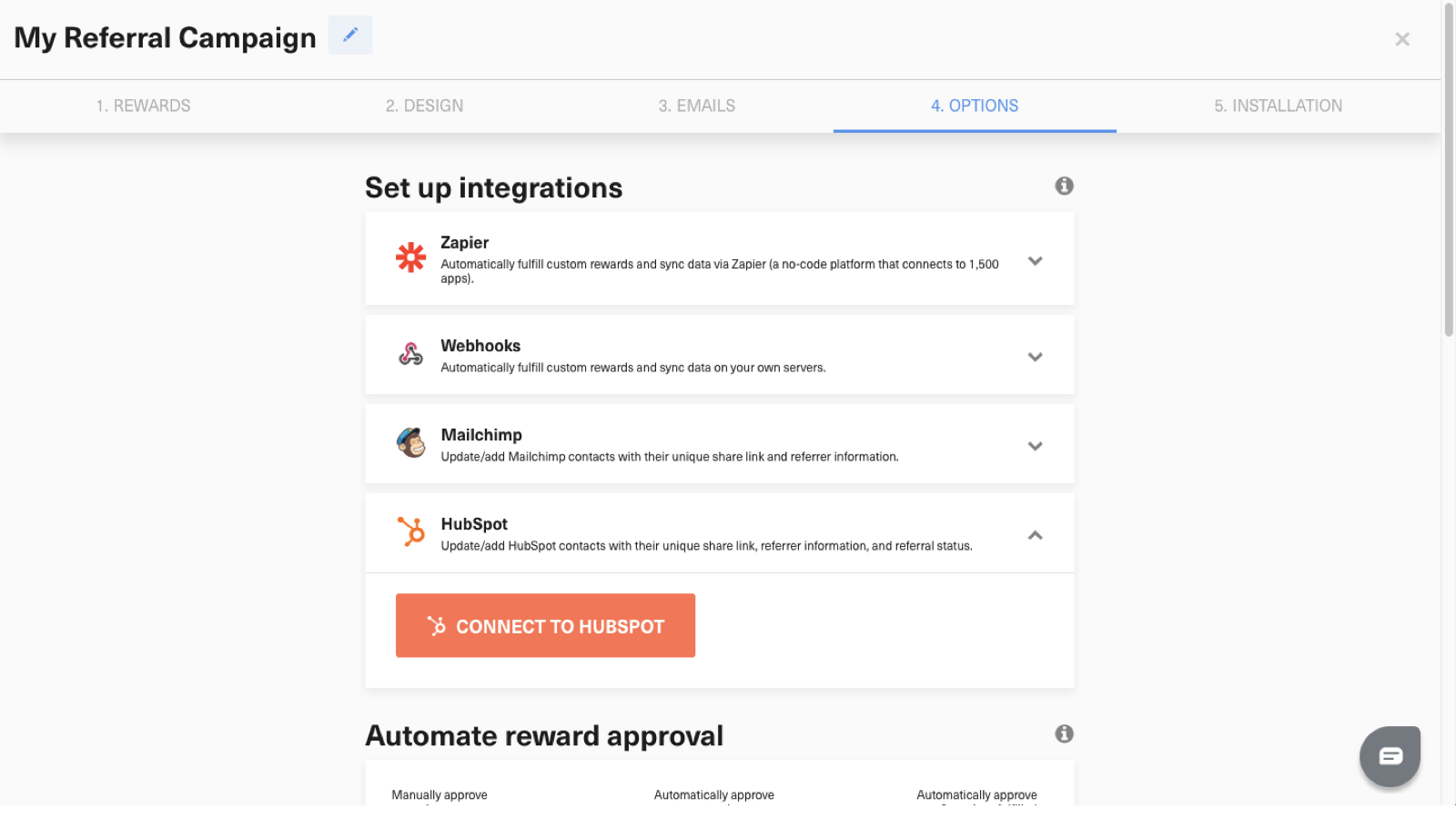
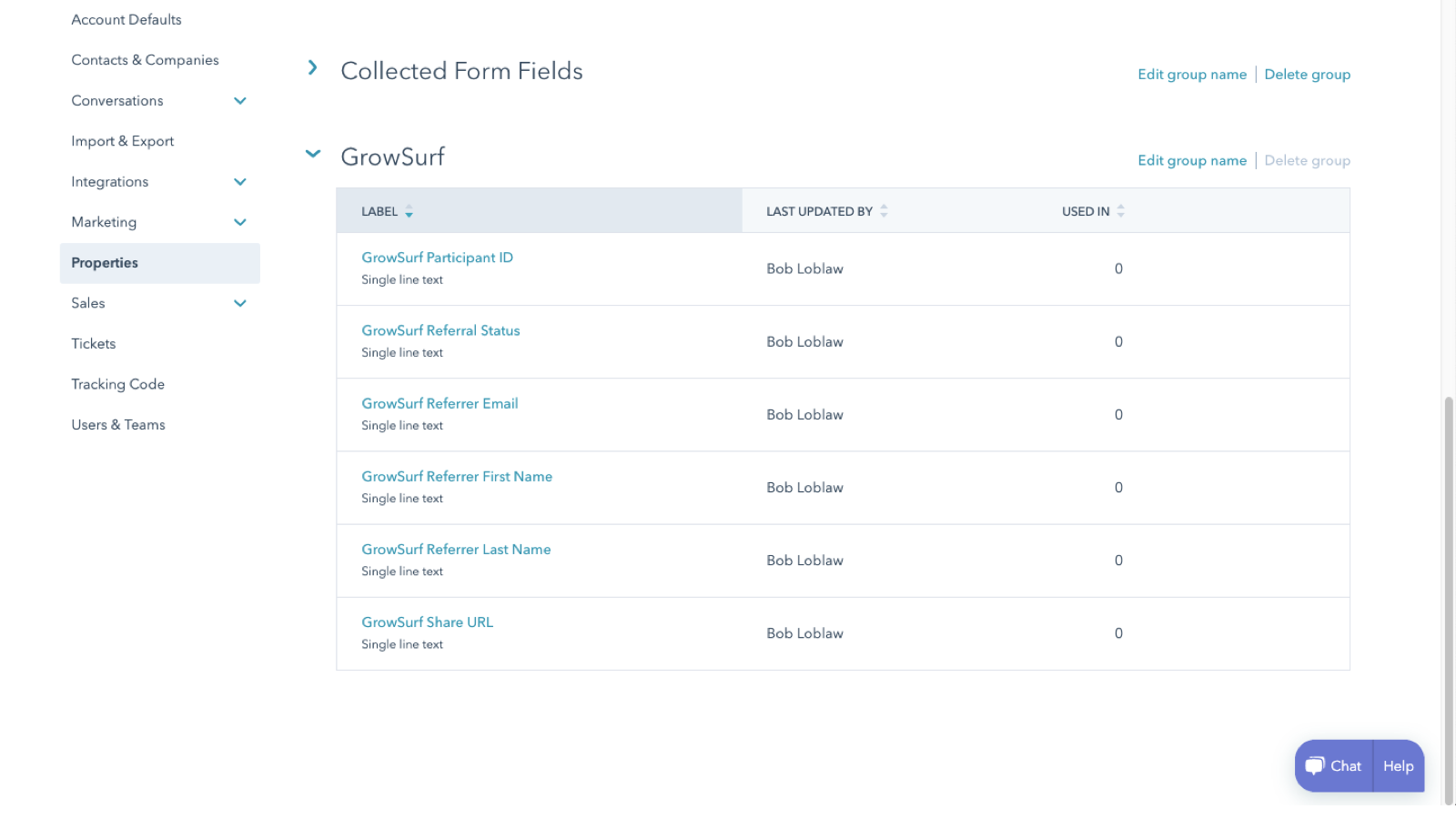
Before you build a score, make sure the GrowSurf property group is present on contact records. That confirms HubSpot can read the referral fields you plan to score.
A strong starting point is to add points when a contact has referred at least one person, when referral status has reached an awarded state, or when referral counts show sustained activity. If your team wants to prioritize advocates before they earn the next reward, you can also use the milestone-related properties as a softer signal.
In HubSpot's lead scoring tool, create a contact score and add property-based rules that reference the GrowSurf fields. HubSpot handles the score calculation and storage; GrowSurf keeps the source properties current on the contact record.
Once the score is live, use it to create segments for high-value advocates, alert sales or lifecycle teams, or enroll scored contacts in follow-up workflows. If your team does not have access to HubSpot's lead scoring tool, use the GrowSurf fields directly in segments as the fallback.
Validate the score on two real records: one contact with no referral activity and one active referrer. That helps you confirm the point thresholds make sense before the score is used in routing or campaigns.
Let HubSpot decide who should be prioritized for outreach, and let GrowSurf decide who has earned referral credit or rewards. Those are related decisions, but they should not be the same rule set.
A score built from a few strong GrowSurf properties is easier to trust than a score overloaded with weak signals. Begin with referral count or referral status, then add more nuance after you review the distribution.
HubSpot's lead scoring tool is tied to specific HubSpot tiers. If a team does not have access, use the GrowSurf properties in segments and views first, then upgrade the scoring layer later.
Use the native HubSpot sync so your team can see share links, referral status, and referrer details on the contact record.
View Guide →Use GrowSurf contact properties in HubSpot emails and workflows so every participant sees their own referral link and referral context.
View Guide →Use HubSpot deal-stage referral triggers in GrowSurf so a qualified deal stage can award referral credit without a custom workflow bridge.
View Guide →The most useful starting fields are referral count, referral status, and other properties that show whether a contact has successfully referred someone or is actively progressing toward a milestone.
No. GrowSurf syncs the referral properties onto the HubSpot contact record, and HubSpot's scoring tool calculates the score from the rules you define there.
You can still get value from the integration. Build HubSpot segments, saved views, and workflows directly from the GrowSurf properties until you have access to the scoring tool.
Trusted by marketing and product teams at fast-growing B2C, fintech, and SaaS companies
Successfully submitted!
Error! Please try again
See referral programs that our customers have implemented.
