

 Salesforce
 Stripe
 HubSpot
 Chargebee
 Recurly
 PayPal
 Tango Card
 Webhooks
 Zapier



Learn more
Built for startups,
scaled for unicorns
Successfully submitted!
Error! Please try again
See what it takes to set up a referral/affiliate program
Explore GrowSurf's powerful referral marketing platform
Watch a video demo of setting up a referral/affiliate program
GrowSurf plugs into your existing tools
GrowSurf vs other referral software providers
Explore our free suite of referral marketing tools.
Explore our free suite of tools built for startups.
Get discounts on top software and services like Notion, Deel, Apollo, and 1Password.
Explore Deals →
Our free loyalty software lets you reward your customers when they leave reviews, share on social media, and mention your brand.
Get It Free →Can you guess which startups made these growth tactics famous? Test your knowledge of innovative marketing strategies that led to explosive growth.
Play Now →
Want the full setup walkthrough?
Use these docs for exact setup steps, supported fields, and troubleshooting.
GrowSurf keeps each participant's referral state current inside Intercom, including the share URL they should use and the progress they have already made toward rewards.
That makes it practical to add a referral step to onboarding after the customer has reached first value, instead of asking for a referral too early.
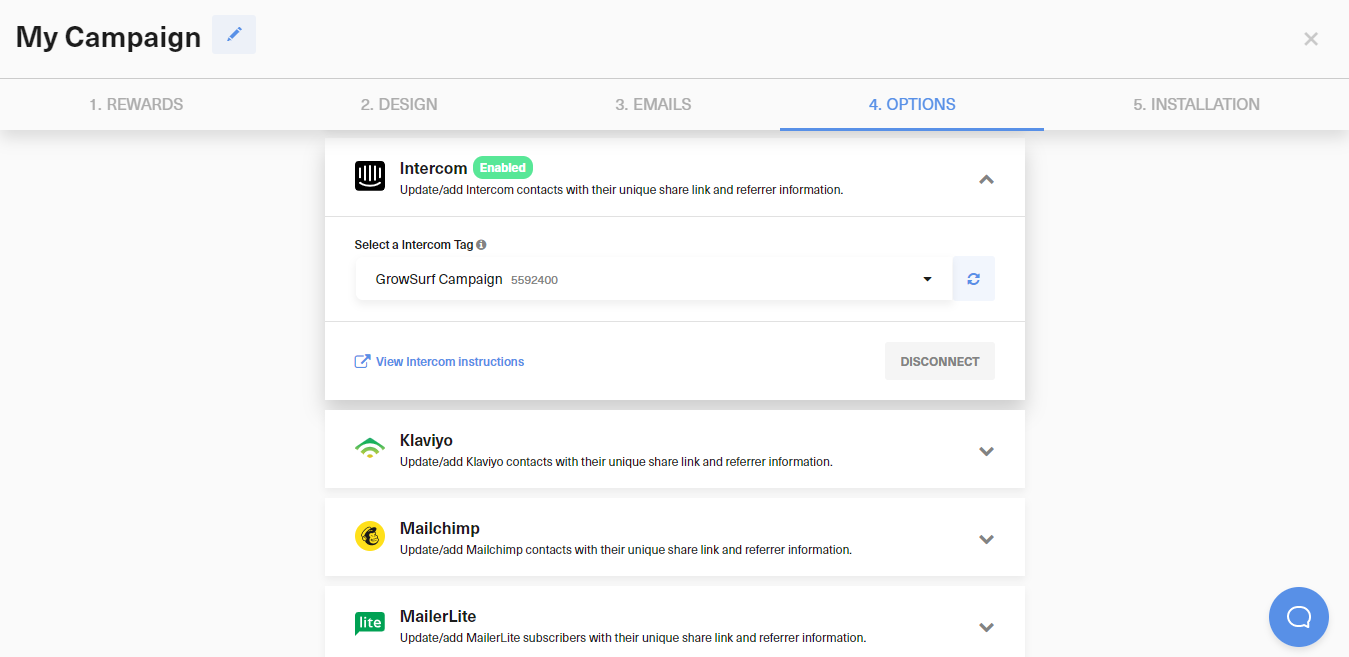
In Campaign Editor > 4. Options > Integrations, connect Intercom, authorize the account, select the Intercom tag you want GrowSurf to use, and save the integration.
Add the referral step only after the user has completed the onboarding action that proves they understand the product. The prompt should feel like the next logical action, not like extra work.
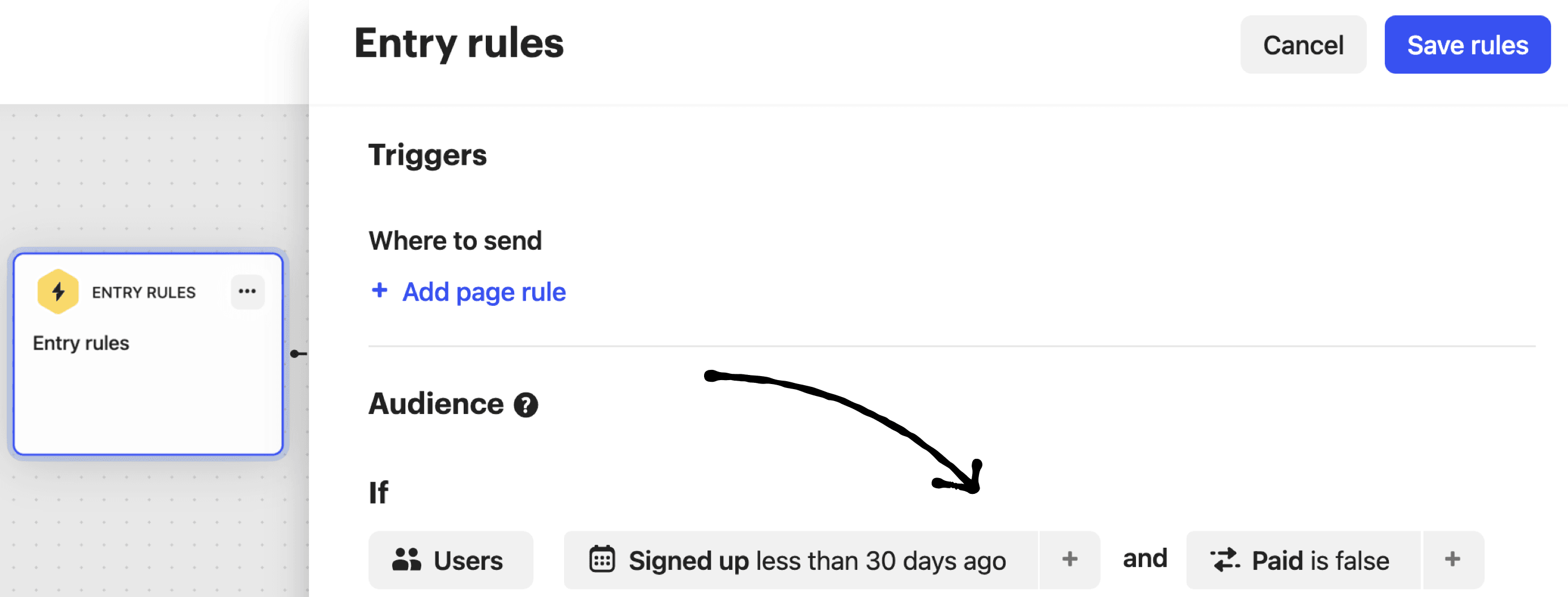
In your onboarding series or entry rules, target recently activated users whose GrowSurf data shows they are participants but have not yet reached the referral outcome you care about.
Use a button that opens the referral portal, referral page, or embedded widget you already run with GrowSurf. If a plain link is more helpful in the message body, use {{ custom_data.growsurf_share_url }}.
Preview the onboarding path against a participant who already exists in both GrowSurf and Intercom so you can confirm the entry rules, CTA, and personalization all match live data.
The best onboarding referral prompts happen after the user has already experienced value and can confidently recommend the product.
If you want imported users to receive GrowSurf attributes going forward, enable the Intercom integration before you import them into the campaign.
Point onboarding, outbound prompts, and lifecycle messages to the same GrowSurf referral experience so customers always land in the same sharing flow.
Use GrowSurf's native Intercom sync to target referral prompts in Intercom Outbound with live participant data.
View Guide →Use GrowSurf-synced Intercom custom data to build referral-aware audiences and reuse them across Intercom messages.
View Guide →
Use GrowSurf referral fields in ActiveCampaign automations so new participants, active referrers, and reward earners get the right follow-up.
View Guide →After the user reaches the first meaningful value moment in your product. Before that, the ask usually feels premature.
Yes. Use {{ custom_data.growsurf_share_url }} when the Intercom message should display the participant's unique share link directly.
Enable the integration before future imports, then use GrowSurf's participant-sync remedies if you need to backfill people who were imported before the connection existed.
Trusted by marketing and product teams at fast-growing B2C, fintech, and SaaS companies
Successfully submitted!
Error! Please try again
See referral programs that our customers have implemented.
