


 Stripe
 Chargebee
 PayPal
 Wise
Wise Tango Card
 Tremendous
 Recurly
 Braze
Braze Zapier
 Webhooks






Learn more
Built for lean teams,
scaled for category leaders
Thanks. You're signed up.
Something went wrong. Please try again.

If you've raised a Seed or Series A, you're eligible for up to 50% off your first year plus additional usage bonuses.
Learn more →
Want the full setup walkthrough?
Use these docs for exact setup steps, supported fields, and troubleshooting.
GrowSurf's Salesforce integration handles two separate jobs: it can sync GrowSurf participant fields onto Salesforce contacts, and it can trigger a referral when a Salesforce record matches the exact condition you configure.
For attribution, the important setup is the Referral Trigger. Salesforce supplies the record update, while GrowSurf decides whether the participant match is valid, credits the referrer, and unlocks any referral rewards tied to that conversion.
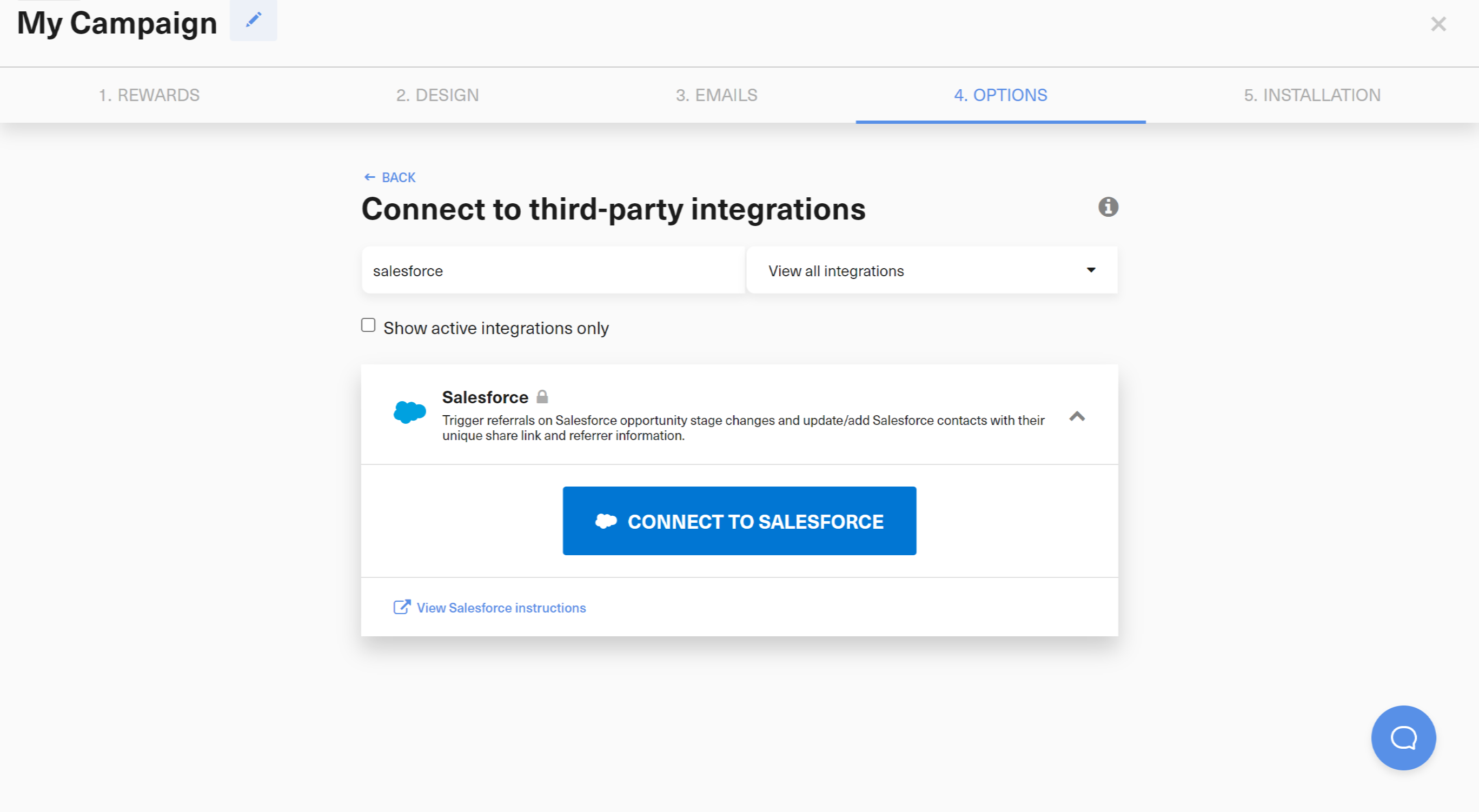
Connect Salesforce in GrowSurf first, and make sure the Salesforce user you authorize can create custom fields, assign field permissions, manage contacts, and manage the Salesforce event PushTopic GrowSurf uses for referral-trigger events. GrowSurf uses that connection for both contact-field sync and referral-trigger settings.
If the Salesforce user cannot create or update that PushTopic subscription, GrowSurf may let you connect Salesforce but fail when you try to enable or change a Salesforce referral trigger. In that case, ask your Salesforce admin to grant the missing API and PushTopic permissions before you continue.
Turn on Referral Trigger, then choose the Salesforce object, direct trigger field, and exact value that should qualify the referral. New setups can use Opportunity, Lead, Contact, Account, or another queryable Salesforce custom object.
Use a single-value trigger field. GrowSurf does not currently support Salesforce multi-select picklist fields or large text / textarea fields for referral triggers, so choose a standard picklist, boolean, or compatible single-line text field instead.
Keep the trigger focused on the business event that actually matters. Common choices are a closed-won opportunity, a lead status that proves handoff or acceptance, or a custom object state that confirms the customer reached the milestone you care about.
GrowSurf keeps participant matching explicit. For new Opportunity setups, Use the Primary Opportunity Contact is the default, while Use all Opportunity Contacts (advanced) stays available as an advanced option. Leads use Lead.Email to find the participant, Contacts use Contact.Email, and Accounts or custom objects must use either a direct email field, a direct Contact lookup, or a direct Lead lookup.
If your team sees Salesforce records match the rule briefly and then move back out, turn on a referral trigger hold period. GrowSurf will cancel the referral if the selected Salesforce record stops matching before that hold window finishes.
Salesforce record updates are processed asynchronously. During testing, update a known record, wait for GrowSurf to receive the event, and inspect the participant activity log before you assume the referral should have credited instantly.
Choose the record state that actually represents sales acceptance, qualification, enrollment, or revenue validation for your business. That keeps GrowSurf credit aligned with the outcome you care about instead of an early CRM status that can still reverse later.
GrowSurf is easiest to reason about when the participant path is obvious. Prefer a single primary Opportunity contact, a direct email field, or a direct Lead/Contact lookup over anything that depends on indirect Salesforce relationships.
If a record update does not appear immediately, open the participant's GrowSurf activity log first. Salesforce sends these updates asynchronously, and GrowSurf may need a short delay before it can process the event.
Sync GrowSurf referral fields into Salesforce contacts so sales and success teams can see share links, referral status, and referrer context without manual exports.
View Guide →Build Salesforce reports and dashboards on top of GrowSurf-synced contact fields so your team can separate referred pipeline from the rest of the CRM.
View Guide →
Use HubSpot deal-stage referral triggers in GrowSurf so a qualified deal stage can award referral credit without a custom workflow bridge.
View Guide →Yes. New Salesforce referral-trigger setups can use Opportunity, Lead, Contact, Account, or another queryable Salesforce custom object, as long as you choose a direct trigger field and an exact value to match.
Not yet. GrowSurf currently supports exact-match triggers on single-value Salesforce fields such as standard picklists, booleans, and compatible single-line text fields. Multi-select picklists and large text / textarea fields are not supported for Salesforce referral triggers.
The connected Salesforce user needs enough access to create GrowSurf's contact fields, assign field permissions, manage contacts, and create or update the Salesforce event PushTopic used for referral-trigger events. If Salesforce connects successfully but saving the referral trigger fails, this missing PushTopic permission is one of the first things to check with your Salesforce admin.
That depends on the object you choose. New Opportunity setups default to Use the Primary Opportunity Contact, with Use all Opportunity Contacts (advanced) still available as an advanced option. Leads use Lead.Email, Contacts use Contact.Email, and Accounts or custom objects must use a direct email field or a direct Lead/Contact lookup to identify the participant. GrowSurf then gives referral credit to that participant's referrer.
Yes. The Salesforce Referral Trigger settings in GrowSurf include an optional hold period. If the record stops matching during that hold window, GrowSurf cancels the referral instead of crediting it.
No. Sync Data and Referral Trigger are configured separately. Use Sync Data when you also want GrowSurf fields such as share URL or referral status on Salesforce contacts, but the referral trigger itself is its own setting.
Launch a refer-a-friend or affiliate program that lowers your acquisition costs and builds customer loyalty, with little engineering work.
Trusted by marketing and product teams that grow through customer, user, and partner referrals.
Thanks. You're signed up.
Something went wrong. Please try again.
See referral programs that our customers have implemented.
Thanks. View the GrowSurf customer examples.
Something went wrong. Please try again.
