

 Salesforce
 Stripe
 HubSpot
 Chargebee
 Recurly
 PayPal
 Tango Card
 Webhooks
 Zapier



Learn more
Built for startups,
scaled for unicorns
Successfully submitted!
Error! Please try again
See what it takes to set up a referral/affiliate program
Explore GrowSurf's powerful referral marketing platform
Watch a video demo of setting up a referral/affiliate program
GrowSurf plugs into your existing tools
GrowSurf vs other referral software providers
Explore our free suite of referral marketing tools.
Explore our free suite of tools built for startups.
Get discounts on top software and services like Notion, Deel, Apollo, and 1Password.
Explore Deals →
Our free loyalty software lets you reward your customers when they leave reviews, share on social media, and mention your brand.
Get It Free →Can you guess which startups made these growth tactics famous? Test your knowledge of innovative marketing strategies that led to explosive growth.
Play Now →
Want the full setup walkthrough?
Use these docs for exact setup steps, supported fields, and troubleshooting.
GrowSurf can feed referral events into Segment, and Segment can then load that verified source into warehouse destinations such as BigQuery, Redshift, Snowflake, Postgres, or Databricks. This is the cleanest setup when your analysts want referral reporting beside product, billing, or lifecycle data in SQL.
The key distinction is timing: GrowSurf sends events into Segment as the referral journey happens, but Segment's warehouse destinations load data in batches on a schedule. This guide helps you validate the source first, then use the warehouse for durable reporting instead of instant operational triggers.
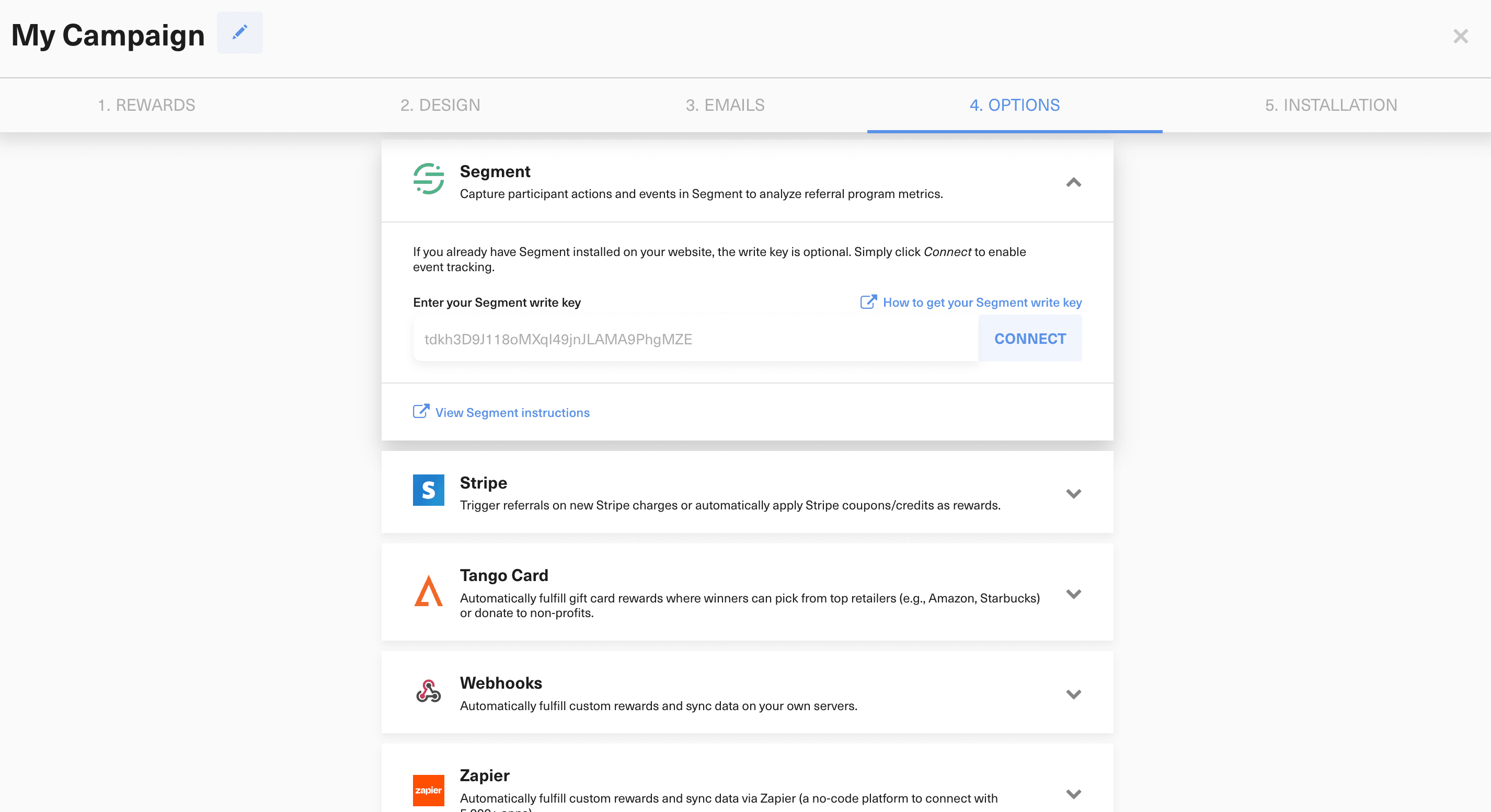
In Campaign Editor > 4. Options > Integrations, connect Segment and add the write key when GrowSurf needs to load Segment itself. If Segment is already installed on every referral surface, the key is optional, but the integration still needs to be enabled so GrowSurf can emit the referral events.
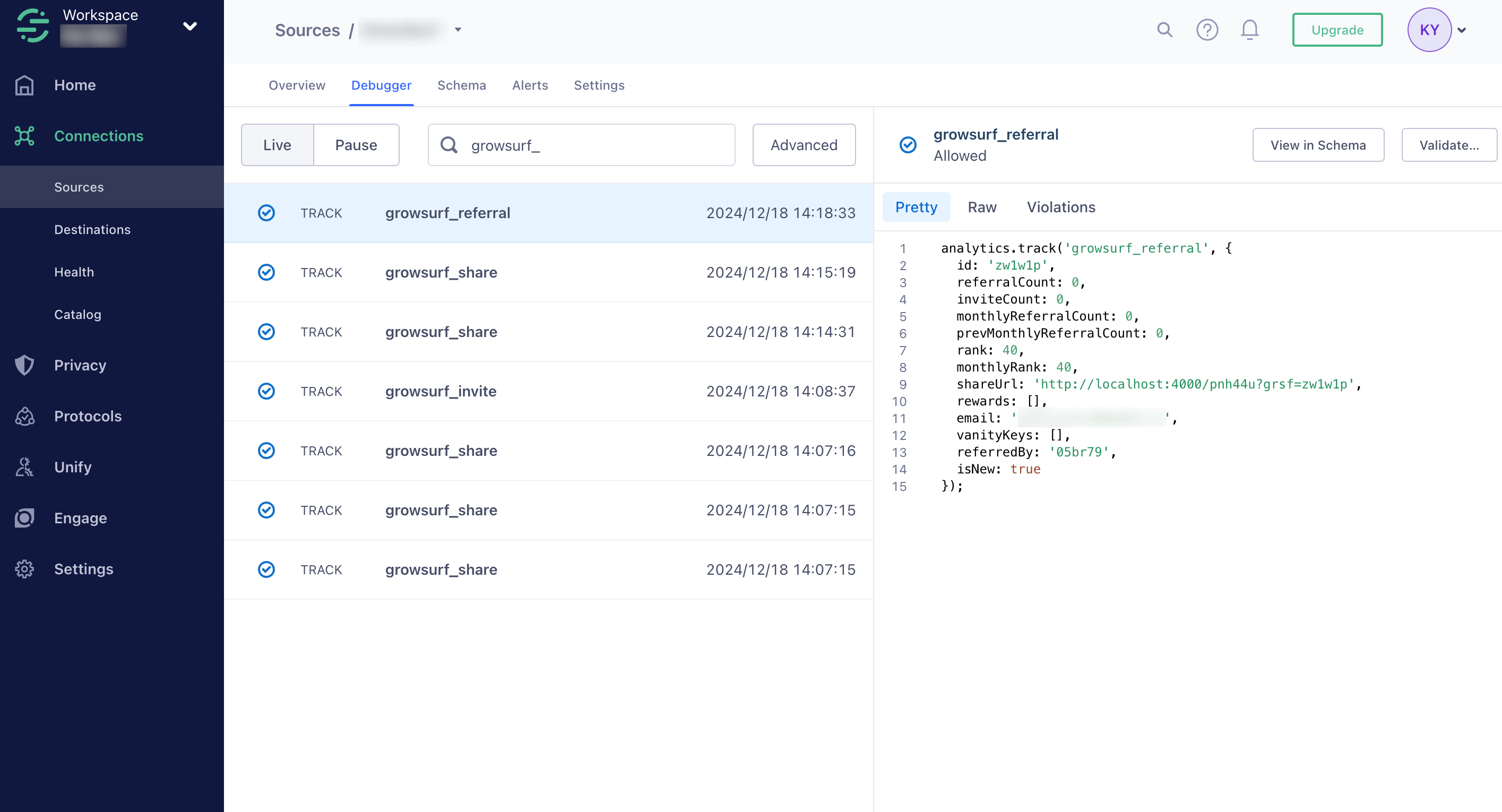
Before you think about tables or warehouse models, confirm Segment is receiving growsurf_signup, growsurf_share, growsurf_invite, growsurf_referral, and growsurf_referral_trigger where relevant. Segment's Source Debugger is the fastest first check, even though Twilio documents it as sampled and capped.
Connect your warehouse destination inside Segment and let Segment handle the load process. Twilio's warehouse docs describe these syncs as bulk loads that run on a regular cadence, so do not treat the warehouse as an instant event stream or an alerting system.
Once the source is clean, check the warehouse destination's sync history, schema, and loaded tables. The debugger tells you whether events reached Segment; your warehouse destination tells you whether the batch load completed and the data landed where your team expects it.
After the tables are healthy, join the GrowSurf referral events to your product usage, CRM, or billing data in SQL. That is where this pattern pays off: you can analyze referral-sourced users, qualified referrals, and revenue outcomes in the same warehouse model your team already trusts.
If the GrowSurf events are not arriving in Segment cleanly, no warehouse model will fix the missing data later. Always clear the source-validation step before debugging transformations or dashboards.
Warehouse destinations are designed for durable reporting, not real-time product logic. If a stakeholder expects an event to appear instantly in SQL, set expectations around Segment's bulk-load cadence first.
Segment's debugger is useful for quick validation, but the warehouse is where you should keep the long-lived referral dataset that powers BI, attribution, and deeper cohort analysis.
Connect the native Segment integration, verify the five GrowSurf referral events, and route clean referral data into the destinations you already use.
View Guide →
Use GrowSurf referral events in Mixpanel cohorts to separate new participants, active sharers, and converted referrals.
View Guide →
Use GrowSurf's GA4 events to separate referrer activity from referred-friend signups and the downstream actions that actually count as successful referrals.
View Guide →No. Twilio Segment documents warehouse destinations as bulk-load syncs that run on a schedule, so they are better for reporting and modeling than for instant operational triggers.
The same documented Segment event family should arrive downstream: growsurf_signup, growsurf_share, growsurf_invite, growsurf_referral, and growsurf_referral_trigger when your program uses trigger-based qualification.
No. Segment's debugger is a quick validation surface and Twilio documents it as sampled and capped. Use it to confirm delivery, then rely on the warehouse sync status and loaded tables for durable reporting.
Trusted by marketing and product teams at fast-growing B2C, fintech, and SaaS companies
Successfully submitted!
Error! Please try again
See referral programs that our customers have implemented.
