

 Salesforce
 Stripe
 HubSpot
 Chargebee
 Recurly
 PayPal
 Tango Card
 Webhooks
 Zapier



Learn more
Built for startups,
scaled for unicorns
Successfully submitted!
Error! Please try again
See what it takes to set up a referral/affiliate program
Explore GrowSurf's powerful referral marketing platform
Watch a video demo of setting up a referral/affiliate program
GrowSurf plugs into your existing tools
GrowSurf vs other referral software providers
Explore our free suite of referral marketing tools.
Explore our free suite of tools built for startups.
Get discounts on top software and services like Notion, Deel, Apollo, and 1Password.
Explore Deals →
Our free loyalty software lets you reward your customers when they leave reviews, share on social media, and mention your brand.
Get It Free →Can you guess which startups made these growth tactics famous? Test your knowledge of innovative marketing strategies that led to explosive growth.
Play Now →
Want the full setup walkthrough?
Use these docs for exact setup steps, supported fields, and troubleshooting.
GrowSurf's Segment integration sends referral activity into Segment so your team can analyze the same participant journey everywhere else you already report. GrowSurf identifies participants by email, emits the referral events from your live referral surfaces, and avoids loading the Segment library twice when Segment is already present.
This guide is for the setup and validation layer: connect the integration, keep the right events enabled, and make sure Segment is receiving the referral journey before you branch into other analytics tools or warehouse destinations.
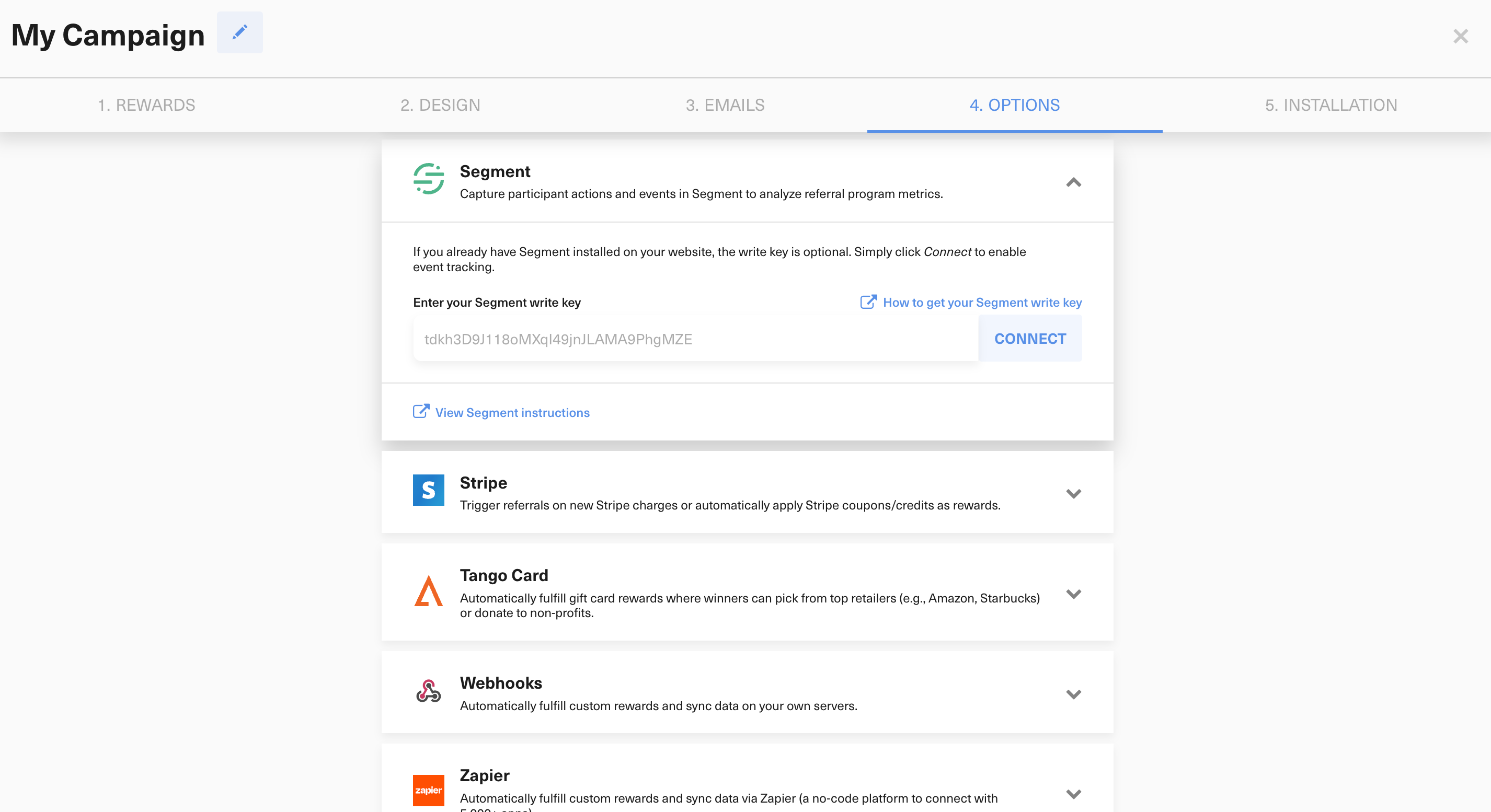
Open Campaign Editor > 4. Options > Integrations, choose Segment, and connect the integration. If Segment is already installed on every referral surface, the write key is optional and you can still enable the integration. GrowSurf recommends saving the key anyway so referral pages without a preinstalled Segment snippet are still covered.
growsurf_signup for new participants who join and receive a share link.growsurf_share when a participant uses GrowSurf's social or copy-link share actions.growsurf_invite when a participant sends email invites from GrowSurf.growsurf_referral when a referred visitor signs up through a referral link.growsurf_referral_trigger when a referred participant completes the qualifying action and you use growsurf.triggerReferral().Start with the full event set enabled, then turn off any events you truly do not need after you confirm the source is clean.
GrowSurf's own docs call out two URLs that teams often miss: the referral portal and the referred-friend landing page or signup page. Segment needs to be allowed on both surfaces, otherwise your source will show only part of the referral journey.
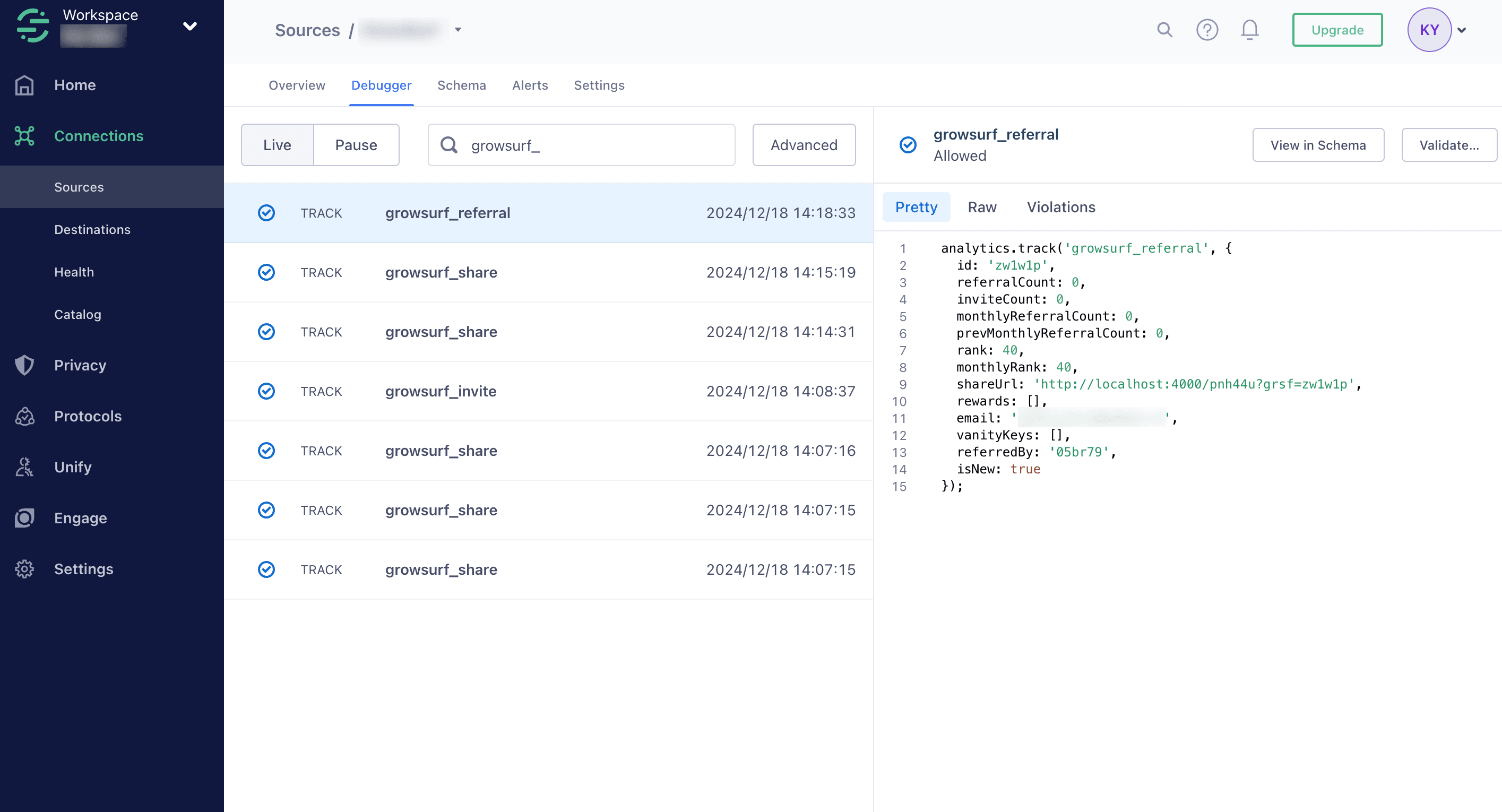
Run a real participant test, then check Segment's Source Debugger for the GrowSurf events. Twilio Segment documents the debugger as a sampled, capped validation tool, so treat it as the fastest way to confirm delivery, not as your permanent event archive.
Once Segment is receiving the right GrowSurf events, forward them to your product analytics tools, customer data tools, alerting destinations, or warehouse. That keeps every downstream report tied back to the same verified referral source instead of debugging multiple tools at once.
Validate a full journey from participant signup through share, referred-friend signup, and referral trigger if your program uses one. Segment is easiest to trust when you have seen each step from a known participant record.
GrowSurf identifies Segment users by email, so mismatched emails between your referral flow, your app, and your test records are one of the fastest ways to create confusing event histories.
GrowSurf's docs note that Segment can take up to 15 minutes to surface events. If the source looks quiet right away, wait briefly before assuming the integration is broken.
Use GrowSurf as the event source, Segment as the routing layer, and your warehouse as the durable reporting destination for referral data.
View Guide →
Use GrowSurf referral events in Mixpanel Funnels to see where participants drop between signup, sharing, invite, and qualified referral.
View Guide →
Connect GrowSurf to Amplitude so you can verify referral events, inspect participant properties, and build reporting around referral activity.
View Guide →No. The write key is optional if Segment already loads on every referral page. It is still recommended when you want GrowSurf to cover pages that may not already include the Segment snippet.
The documented Segment integration sends five core events: growsurf_signup, growsurf_share, growsurf_invite, growsurf_referral, and growsurf_referral_trigger.
Start with the GrowSurf integration settings, then validate both the referral portal and referred-friend landing page, and finally inspect Segment's Source Debugger. Also note that ad blockers and Segment processing delays can hide events during testing.
Trusted by marketing and product teams at fast-growing B2C, fintech, and SaaS companies
Successfully submitted!
Error! Please try again
See referral programs that our customers have implemented.
