

 Salesforce
 Stripe
 HubSpot
 Chargebee
 Recurly
 PayPal
 Tango Card
 Webhooks
 Zapier



Learn more
Built for startups,
scaled for unicorns
Successfully submitted!
Error! Please try again
See what it takes to set up a referral/affiliate program
Explore GrowSurf's powerful referral marketing platform
Watch a video demo of setting up a referral/affiliate program
GrowSurf plugs into your existing tools
GrowSurf vs other referral software providers
Explore our free suite of referral marketing tools.
Explore our free suite of tools built for startups.
Get discounts on top software and services like Notion, Deel, Apollo, and 1Password.
Explore Deals →
Our free loyalty software lets you reward your customers when they leave reviews, share on social media, and mention your brand.
Get It Free →Can you guess which startups made these growth tactics famous? Test your knowledge of innovative marketing strategies that led to explosive growth.
Play Now →
Want the full setup walkthrough?
Use these docs for exact setup steps, supported fields, and troubleshooting.
GrowSurf's native SendGrid integration keeps your SendGrid contact list updated with each participant's referral link, referral status, referrer details, and progress counts.
Use this guide when you want to build reusable SendGrid templates for referral launches, newsletters, or lifecycle emails. Once the sync is connected, you can pull those values directly into your template blocks instead of hand-editing referral copy for every send.
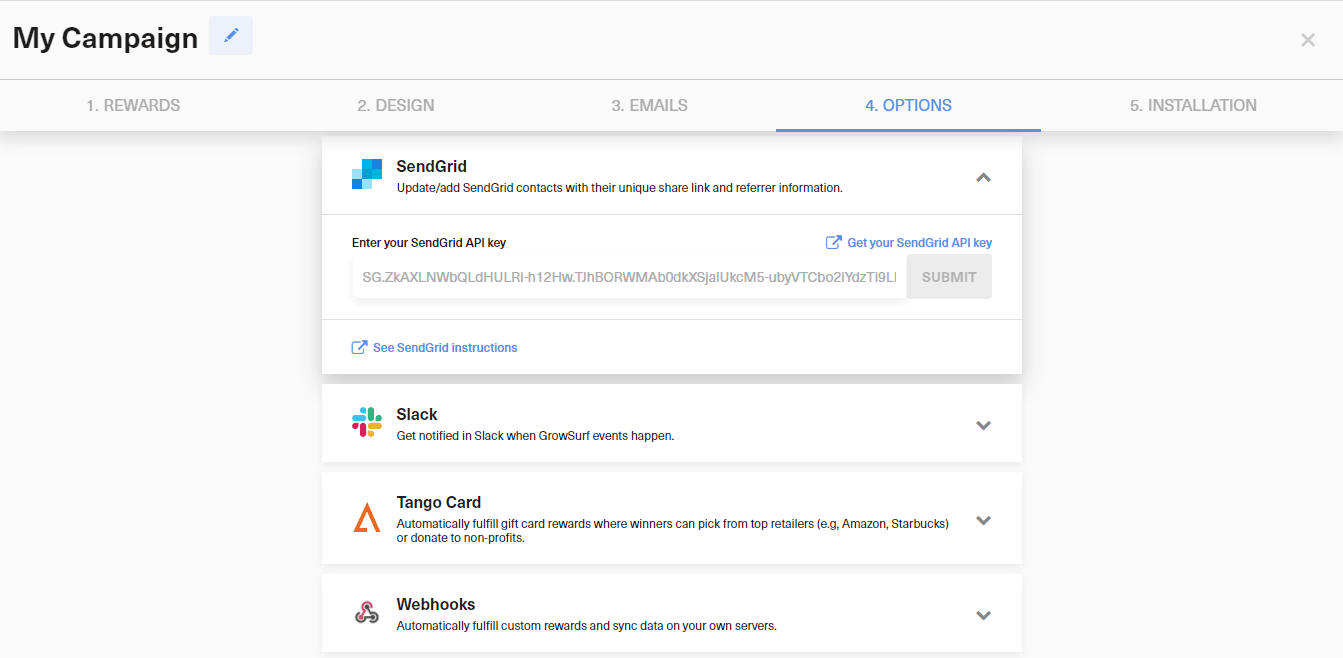
Create a SendGrid API key with full Marketing access, then paste it into Campaign Editor > Options > Integrations in GrowSurf. GrowSurf's SendGrid docs note that the contact sync only starts after the integration is connected, so it is best to connect the integration before you import or add participants.
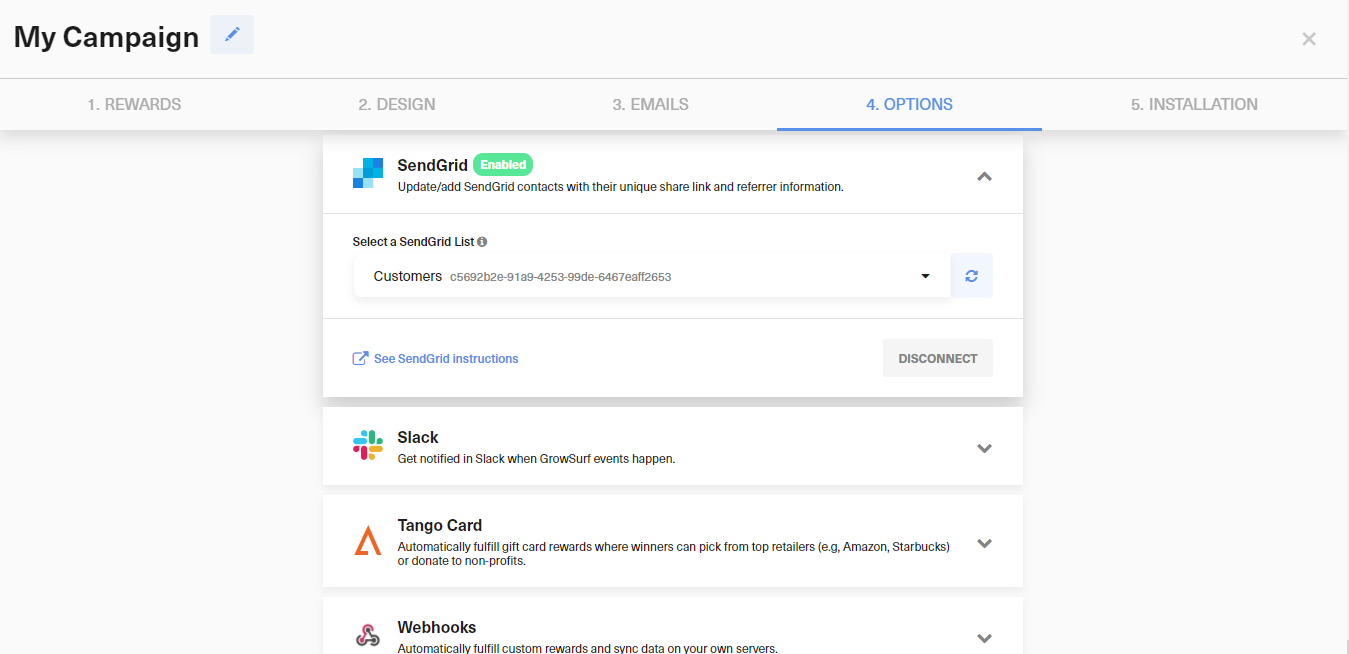
Pick the SendGrid list you want to keep current. GrowSurf will add or update contacts whenever a participant joins or gets referred, and it will automatically create the custom fields you can use in your templates.
For most referral template blocks, start with these fields:
growsurf_share_url for the participant's personal referral linkgrowsurf_total_referral_count when you want to show progress or social proofgrowsurf_referral_status when your message changes after a conversion eventgrowsurf_next_milestone when your campaign uses milestone rewards and you want the next reward to feel timelyIn SendGrid Marketing Campaigns, these placeholders are used as custom fields. Keep the field names exactly as GrowSurf creates them so your template preview resolves correctly.
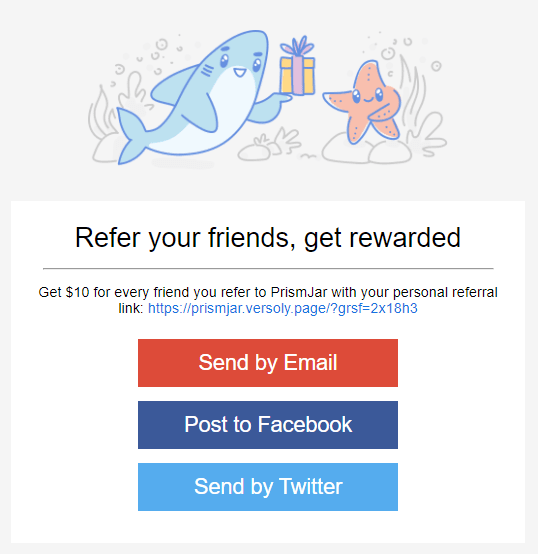
The GrowSurf tutorial examples are a strong starting point when you want a complete referral section instead of just a plain text link. Keep the message focused on one main action: share the link, invite a friend, or open the referral portal.
Use an existing participant record that has already synced to SendGrid and confirm the share link, milestone text, and counts all render the way you expect. SendGrid's Marketing Campaigns guidance also recommends waiting until contact uploads finish updating before you send a campaign to that list.
Use a simple reusable block like this inside your SendGrid template:
<p>Share your referral link:</p>
<a href="{{growsurf_share_url}}">{{growsurf_share_url}}</a>
<p>You currently have {{growsurf_total_referral_count}} referrals.</p>
<p>{{growsurf_next_milestone}}</p>
Use growsurf_next_milestone only when your GrowSurf campaign has milestone rewards with Next Milestone text configured.
SendGrid custom fields and handlebars names work best with letters, numbers, and underscores. Because GrowSurf already creates the fields for you, the safest path is to reference the exact names from the integration docs.
If you only add one GrowSurf field to a template, make it growsurf_share_url. That is the fastest path from email open to referral action.
SendGrid's current Marketing Campaigns guidance notes that recent contact updates can still be processing in the background. Give the list time to finish updating before you launch a Single Send or automation email.
Use GrowSurf's SendGrid sync plus referral portal links to build welcome, reminder, and progress emails that keep participants sharing.
View Guide →
Sync GrowSurf merge tags into your Mailchimp Audience so every referral email can show the right share link, progress update, and reward message.
View Guide →
Sync GrowSurf referral properties into Klaviyo profiles, then use them in email flows that keep each participant's link and reward progress current.
View Guide →Yes. Once the SendGrid integration is connected and a list is selected, GrowSurf creates the referral custom fields and keeps those values updated on synced contacts.
growsurf_share_url is the most important one. It gives every participant a ready-to-use referral link and makes the CTA immediate.
Yes. GrowSurf's SendGrid docs list growsurf_total_referral_count and growsurf_next_milestone as available fields, so you can combine progress messaging with the main share CTA in one template.
Trusted by marketing and product teams at fast-growing B2C, fintech, and SaaS companies
Successfully submitted!
Error! Please try again
See referral programs that our customers have implemented.
