

 Salesforce
 HubSpot
 Chargebee
 Recurly
 PayPal
 Tango Card
 Webhooks
 Zapier



Learn more
Built for startups,
scaled for unicorns
Successfully submitted!
Error! Please try again
See what it takes to set up a referral/affiliate program
Explore GrowSurf's powerful referral marketing platform
Watch a video demo of setting up a referral/affiliate program
GrowSurf plugs into your existing tools
GrowSurf vs other referral software providers
Explore our free suite of referral marketing tools.
Explore our free suite of tools built for startups.
Get discounts on top software and services like Notion, Deel, Apollo, and 1Password.
Explore Deals →
Our free loyalty software lets you reward your customers when they leave reviews, share on social media, and mention your brand.
Get It Free →Can you guess which startups made these growth tactics famous? Test your knowledge of innovative marketing strategies that led to explosive growth.
Play Now →
Want the full setup walkthrough?
Use these docs for exact setup steps, supported fields, and troubleshooting.
For subscription businesses, the cleanest reward flow is to let GrowSurf unlock the referral reward and let Stripe apply the billing change. That keeps the reward logic in GrowSurf and the actual billing effect in the subscription system.
This setup works well for rewards like one free month, a recurring subscription discount, or credits that accumulate on the customer balance.
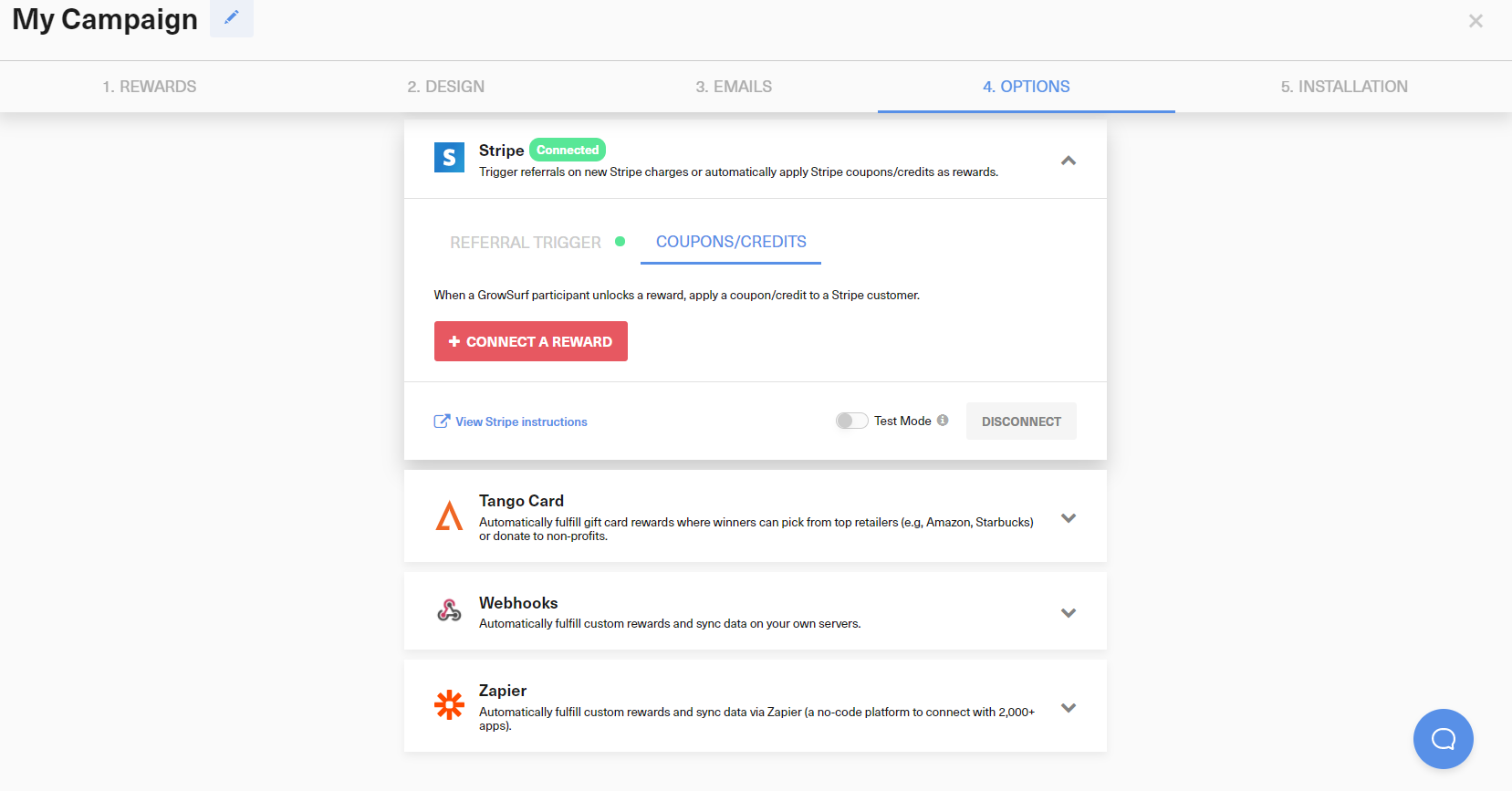
After Stripe is connected, use Coupons/Credits to attach the reward that should fire when the referral unlocks. GrowSurf will handle the reward event and then issue the billing reward in Stripe.
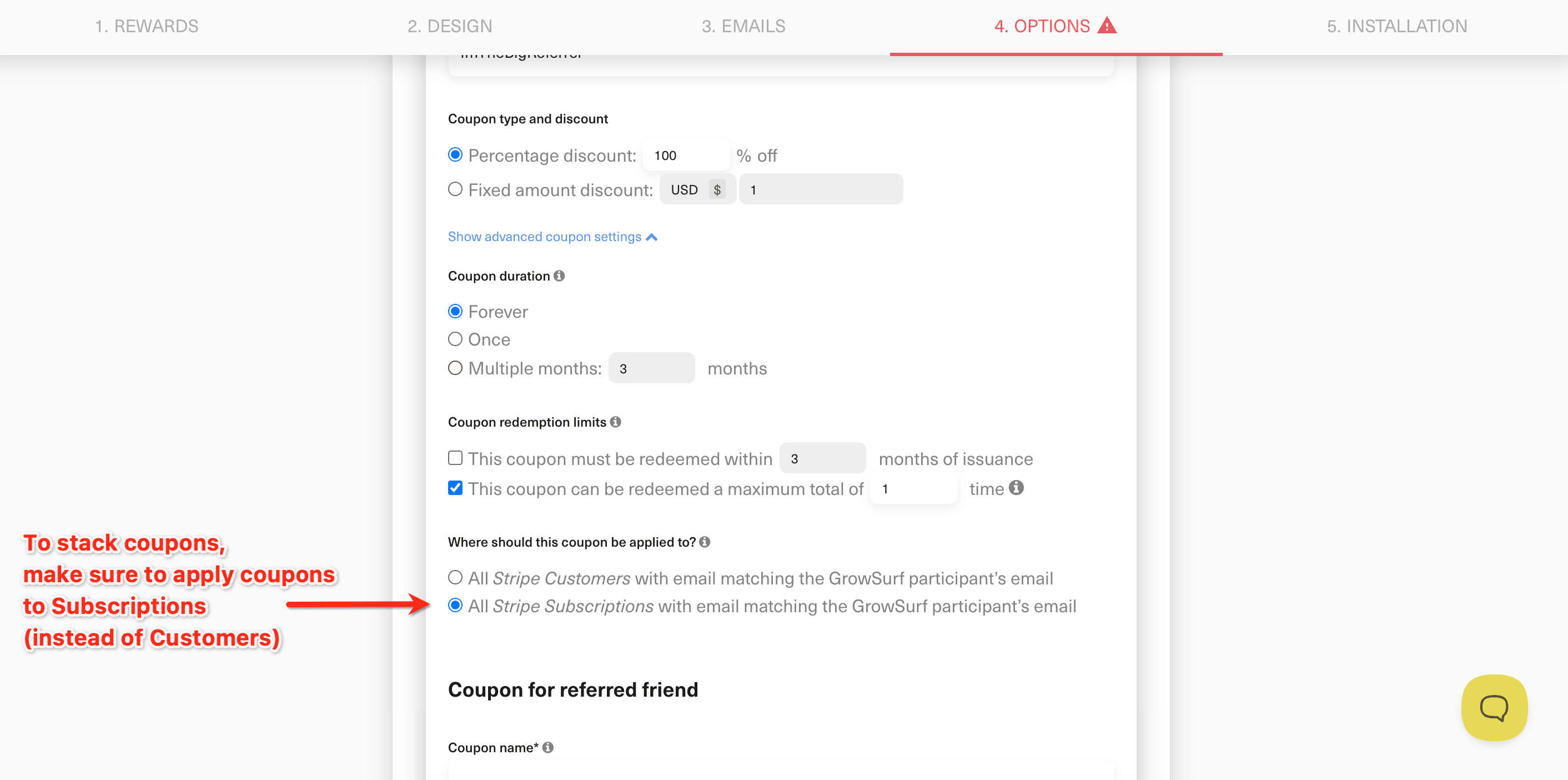
Coupons are the default option for subscription discounts, especially when you want a free month or a discount tied directly to the subscription. Credits are a better fit when the reward should accumulate on the customer balance instead.
In double-sided campaigns, GrowSurf lets you issue the Stripe reward to the referrer, the referred customer, or both. Save the reward connection once the targeting and billing behavior match the offer you want to run.
If your campaign requires reward approval, GrowSurf waits until approval before issuing the Stripe reward. Also make sure the customer exists in the same Stripe mode you connected and that the customer or subscription currency matches the campaign currency.
When a reward does not show up, start with the participant activity log and reward details in GrowSurf. That usually tells you whether the reward is still pending approval, waiting on Stripe sync, or blocked by a customer or currency mismatch.
Coupons are the simpler starting point for subscription discounts. Credits are usually better when each reward should stack on the customer balance over time.
If a reward works in test mode but not live mode, confirm that you connected the live version of the reward after you switched the integration back to live.
Use GrowSurf to issue Stripe coupons for referrers or referred friends, and optionally surface an upfront promotion code before checkout.
View Guide →Connect GrowSurf rewards to Stripe credits when referrals should add balance to the right customer account automatically.
View Guide →Use Stripe charge events as the qualifying referral action and keep the participant and referrer trail attached to the right customer record.
View Guide →Use a coupon when the reward should behave like a subscription discount or free period. Use a credit when you want the reward to accumulate on the Stripe customer balance instead.
GrowSurf waits until you approve the reward before issuing the Stripe coupon or credit, so a reward can look unlocked before the billing change has been applied.
Yes. Stripe reward connections support GrowSurf test mode, but the reward mappings you create in test mode are separate from the live ones.
Trusted by marketing and product teams at fast-growing B2C, fintech, and SaaS companies
Successfully submitted!
Error! Please try again
See referral programs that our customers have implemented.
